Unit 21: Understanding Video Technology
Analogue camera technology:
These are the original ways of recording footage and audio. They use formats like film stock and tapes to record onto and edit from. This was used during the 20th century before digital took over. Some people still like the old quality that analogue cameras produce. They were bigger than digital cameras so they were not as easy to use or as manoeuvrable as the cameras today.
Digital camera technology: This is now the most popular way of recording footage. This method is much easier and you can record in HD so it will look so much better. Also using SD cards mean it is easier to transfer footage and once its transferred, editing will be much easier. There are different versions of digital cameras. The more expensive you go the more advanced and better quality it will be, but for people who can't afford that or for someone who needs somewhere to start, the cheaper, less advanced cameras is a good starting point. As nearly the whole world uses digital now, it is very easy to find machines that are compatible with the digital cameras.
Camera Functions:
White Balance: This is a setting on the camera which adjusts the lighting to make sure that white objects appear white and colours are how it should be. This can be difficult because light from different sources produce different levels of colour temperature. Different sources of light produce different colours, the white balance setting will make sure that an object will appear the correct colour when being illuminated by a certain source of light. For example it will prevent something like a white bed sheet from appearing orange when being illuminated by a candle.

(image taken from http://www.exposureguide.com/white-balance.htm)
The different types of white balance are:
The different types of white balance are:
AWB – Auto White Balance
Camera constantly monitors the light
and adjusts its colour to maintain white areas.
Indoor – Indoor White Balance
The cameras
colour sensitivity setting that matches the warmer cast.
Outdoor –
Outdoor White Balance
The cameras colour sensitivity setting
that matches the whiter cast of natural
daylight.
Manual – Manual White Balance
(custom)
Manual white balance is a white balance
setting that lets you select the overall colour you prefer.
Exposure: This is how much light is allowed to be let into the lens of the camera. This is done by using the aperture. When the camera is set to auto exposure, it adjusts the opening of the lens' iris to control the amount of light allowed into the camcorder. When it is set to manual exposure, the user can decide on the amount of light that is let in.

Focus: This is when you adjust the camera so the image or subject that your are filming is kept looking sharp in appearance. This can be done by using the manual focus setting which allows the user to focus the lens to where he or she wants By doing this you will be able to keep a fixed focal point. The camera can focus the lens automatically. Auto focus may be easier but it can be slow to respond to focus where you want it to an it may find it hard to find the main focal point you want. A racking focus is a shot where you can change the focus between different subjects or backgrounds. This is an example of a racking focus which shows how the focus setting can be used effectively. (video from http://www.youtube.com/watch?v=vzC0Ek6X5FY)
Shutter Speed: This is how long the shutter of the camera stays open. This is important because the higher the shutter speed is the the individual frames of the footage look sharper. This is because it reduces motion blur. A side effect of a higher shutter speed is that movement in the footage won't look as smooth. This is because the motion blur can smooth the frames of the footage together. Higher shutter speeds are commonly used in coverage of sport.
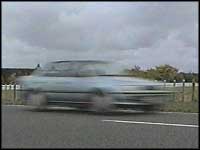
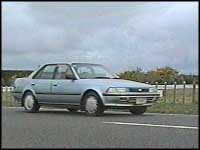
Image on the left is with the shutter off. Image on the right is with a higher shutter speed. Both images taken from. http://www.mediacollege.com/video/camera/shutter/
Gain: When in a location where you can't control the lighting and can't get an ideal source of light, this setting can artificially create a brighter image. Instead of having an image which would have come out dark, the gain setting will make it so it can be seen in much more detail.
Transferring footage to an edit suite:
Using an SD card is a very easy way to transfer. When recording footage, save it by using SD cards so at the end of it you can take the card out and plug it into the computer, with or without a card reader. (Depending on the type of computer you have). Then you can copy all the files onto the computer and it's ready to be used. Once transferred you will also have the original files on your card so if anything happens to the ones on the computer you have a backup ready. If you have saved the footage you have filmed onto the hard drive of the camera then by using a firewire cable you can easily transfer the footage from the camera onto the computer.
Export formats:
Avi: This is a common format that can be played on nearly all devices. This is good when moving footage from different devices, as most of them can play them easily. It can contain bot audio and video data. You can also transfer avi files onto a DVD.
DVD: These are used for audio and video data storage and can be used to transfer files. As well as single layer DVD discs you can also get double layer discs which can usually store up to twice as much as single layer. Some devices can only read certain files formats from a DVD. Avi files can be directly burned/transferred to a DVD.
H.264: This format can achieve high quality video and audio in half the size of other high quality formats. It is currently one of the most used formats for the recording, compression and distribution of high quality video and audio.
MPEG: This is an international standard for the encoding and compression of video.
Video Signals:
DVI (Digital Video Interface): This is used to connect a video source to something that can display it, such as a computer or TV. As it is a video interface standard, many devices can use DVI, this helps when going from different devices. Knowing that other devices will support DVI, you won't have to worry finding other ways to view your footage. Unless connected toHDMi it cannot transmit the audio, just the video.
HDMI (high definition multimedia interface): This is used to transmit high definition audio and video from one device to another. HDMI is the standard method of viewing HD content. For example you can connect a HD camera to a computer or a T.V and view the HD footage you have on it. All of this done with one cable.
HD (High Definition): This is a term used when a video has a higher resolution than standard definition. HD resolution go from 720p to 1080i to 1080p. HD is being used more and more. To view HD video you will need something that can view HD content like a HD TV or computer. You can transfer HD video and audio to a Blu-Ray disc. Blu ray have a bigger storage capacity which is needed for the bigger file sizes of HD. HD files are also different formats. For example MKV or H.264. There is a big difference with HD video and
audio compared to the standard, which is way more and more people are suing it.
Audio Experiment:

Radio Mics: These are wireless and it connects to the recording equipment. Inside it has a small battery powered transmitter. This transmits the audio signal from the microphone which will be on the person who is talking and it send it to the receiver which will be nearby. possibly attached to the camera. Radio mics are very useful because it allows people like, interviewers, entertainers and performers to be able to freely move about with worrying about any microphone or wires. (Image from http://www.shift-4.com/broadcast-equipment/sound-equipment/radio-mics/)

Directional mics: This microphone picks up sound from whatever is in from of it. This is useful because it can eliminate unwanted sounds that would ruin what you are recording.
(Image taken from http://dazzlesoundproductions.wordpress.com/2011/05/31/top-tip-whats-this-for/)
 Voice over mics: These are designed to be mounted on a stand, so that the mic can be pointed towards the person speaking into it. Whatever you say into it, it will record it. (image taken from http://www.prweb.com/releases/2013/6/prweb10815138.htm)
 Audio Levels: You need to have good audio levels, if it's too high it could cause audio distortion and you might not be able to hear it. If its too low then the sound will be too quiet.
(image from http://www.freeimages.co.uk/galleries/sports/music/slides/digital_analyser_display.htm)
Aspect ratios: This is the ratio between the height and width of the picture on screen. 4:3 is the ratio of the picture of standard definition TV screens or monitors. 16:9 has become the most common ratio format for television and computers. Its also the ratio used for HDTV. It is also known as wide screen. In Europe it is the standard ratio format for most digital channels. If you view a film in wide screen that you get the letterbox effect, where a black bar will be above and below the picture. this is because of the aspect ratio you are using. 1.85:1 and 2.39:1 are most commonly used in cinemas to present films. With these you do not get black bars at the top and bottom of the picture. People use the bigger ratios, like 2.39:1 to give more space onscreen for the actors, scenery, action and anything else happening onscreen. The extra 1 on the ratios 1.85:1 and 2.39:1 is used to show the width versus one unit of height.

(Image from (http://vimeo.com/videoschool/lesson/236/aspect-ratios-explained)
Television Standards:
PAL (Phase Alternating Line) is the video standard used primarily in Europe and Africa for displaying television, DVD, and VHS pictures. In Europe we have a different power grid to other places like America, so we couldn't used the NTSC television standard which existed before PAL. So because of this PAL was created that could run on the different power grid that Europe and other parts of the world have. PAL has a superior picture quality to NTSC but NTSC video appears smoother.
NTSC ( National Television System Committee) TV broadcasting standard used mainly in North America, Central America, Japan, and parts of South America. Any standard definition picture with a maximum horizontal resolution of 720 lines and a 480 vertical resolution with a frame rate of 30 frames per second can be defined as NTSC. Conversion with other standards is possible.
SECAM (Séquential Couleur à Mémoire): This is used in used in France, Russia, Eastern Europe and some Middle Eastern countries. Like PAL, it used the same power system, but the colour information is transmitted differently. SECAM can avoid the issue of distortion that can occur with NTSC. It is not compatible with the other standards but conversion is possible.
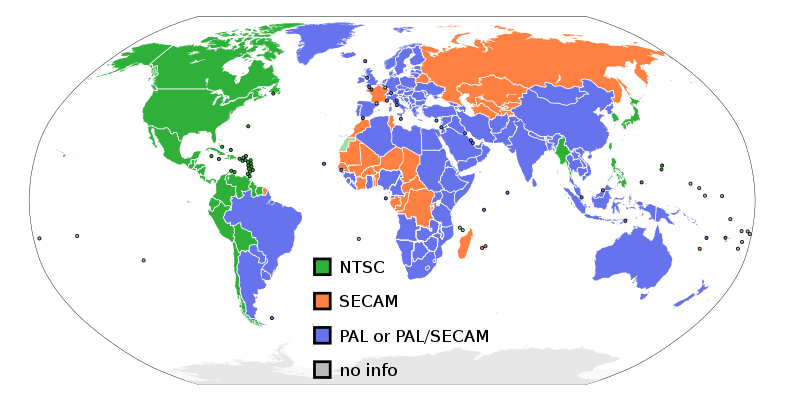
(Image taken from http://en.wikipedia.org/wiki/PAL)
Broadcasting Systems:
Terrestrial: This is a type of TV broadcasting which uses radio waves and TV antennas to pick up reception which is needed to get a picture. This is used instead of satellite transmission or cables. This is no longer used in parts of the world like the U.K which has had a digital switch over, this means you will not be able to pick up any reception or signal and you will now need digital or satellite to view T.V.
Satellite Broadcasting: From a satellite the video and audio are sent to a outdoor antenna or satellite dish. The signals it picks up can offer a wide range of different channels. To get these channels and services you usually would have to pay for them for example, the most popular Satellite TV provide is SKY.
Internet: From provides like Netflix, BBC, ITV, Channel 4 and SKY, you can watch films and TV shows from many different devices, like your TV, computer, phone or tablet. This is done by send the data to your device using video streaming technology. Many providers like Netflix can stream HD content. You need to have an WI-Fi or some type of Internet connection. Depending on the speed of your Internet connection, you may get different results in the quality of the video and the audio and the loading times. Slower connection will mean you will suffer from buffering, which means you have to wait for your device to make sure it can run it smoothly.
Amateur and Professional recording formats:
Solid State: This uses microchip based memory. This is where the footage would be electronically stored om memory chips. When there is footage saved on it you can access it like a normal hard drive. Unlike normal hard drives, solid state have no moving parts so they don't break as easily, which is useful when you need to transfer data because you won't have to worry about breaking anything and losing data. However they do cost more than normal hard drives.
Tape based: This reads and writes data on a magnetic tape. With recording on tape you are limited to how much and how long you can record. each time you want to record a new shot you will need a new tape. This will lead to making sure all of the tapes are labelled correctly, if its not or not even labelled at all then it will be very hard to find the right footage that you need. You might end up with boxes of tapes for one film, which will need have been labelled and sorted in the right way so you don't have to waste time finding specific tapes. Another problem of this is transferring clips from tape to another location to a computer will take a lot of time, especially if you have a longer film. Unlike a disc drive which allows you to look at your data in any order you want, on tape you can only view your data in order. This means if you wanted to view a certain bit of data, for example a specific clip of footage, all of the data before it would need to be read first. Compared to modern hard drives, tapes are much slower. Tapes can be up to a terabyte in size.
Card:An example of this would be an SD card or micro SD card. They are small devices that are able to hold any kind of file. They are used when recording with digital cameras. By saving the footage you have recorded onto an SD card, it is much easier than saving to the cameras hard drive. Also transferring to a computer to edit is much easier, all you would need to do is have a USB card reader, and copy the files you need onto the computer. Also sharing the footage to other members of your group is made easier. If everyone has a SD card with the footage you can share the jobs of transcribing and logging to different people. This makes the process leading up to editing much easier and quicker. Another advantage of an SD card is, even though they are small, they can hold a lot of data on them.
Disc: This is a circular storage device. They are used to store Video, audio and images. Data on these discs can be viewed on different types of machines, for example T.V's and computers. This is a very easy way of sharing your data with other people. As its just a thin circular disc, it is very portable.
Analogue recording formats: These are older formats that a lot of people do not use anymore. These include recording on tape and using film stock. Recording on these formats make it much harder when it comes to the editing stage. With film stock you would have to physically cut it where you want to make an edit. Then by using film splicer and film cement (a special glue designed to join the pieces of film together.) you can put the film together to how you want it.
Digital recording formats: These are formats that are saved and transferred digitally. This makes recording much easier. Digital formats like SD cards and hard drives mean we can record a lot more at the same time and we can fit it all on smaller devices like SD cards. If something goes wrong, we can now easily re record a scene and will be still be saved straight onto an SD card or hard drive.Things like DVD's and CD's and have meant sharing video, audio and pictures have become so much easier. It also means more people are able to see your film, songs and images.
Domestic: This type of video recording used by members of the public who don't have access to more advanced equipment or simply just don't need the more complex equipment. Equipment used will be will be more simple. For example cheaper cameras that can be easily bought in shops or mobile phones. The footage recorded with these would obviously not be as good quality as the more expensive cameras. Post production would be much simpler, as they probably would not have as much footage and they would have the same complex editing software to use. This means they would be limited to what they can do during filming and when editing. This would be low budget film making as they would probably use little or no money for it. These videos would usually be for personal use or to be uploaded to the Internet for others to see. The most popular place for these types of videos would be Youtube. This is where people start using this type of equipment so they would not have any experience before this.

(image taken from http://www.digitaltrends.com/mobile/apple-debuts-iphone-5-camera/)
Professional: The technology here would be much more advanced than domestic. The camera will be more advanced with better quality recording, more features and a more accurate way of filming. It will have more control over the footage you record. It will allow you to easily access features like white balance, focus and exposure. This will mean you can set up the shots you are filming in the way you want. As well as the camera other more advanced equipment will also be available. For example, radio mics, directional mics, better tripod, tracking dollies, different types of lighting and green screen. The will be filmed in bigger groups, each with their own roles. For example Director, Camera man, sound man, producer and editor. The post production stage will be more complex, as there would probably more and longer footage. This means there would be more transcribing and logging involved. The editing stage will take longer as the projects would be more complex, for example a documentary, so more complicated editing will need to be done. Also the editing software would allow for more options when editing so the finished film would look a lot better than the ones done using domestic technology. People doing using professionally might have more experience as they are used to using cameras and now what to do.

(image taken from http://www.hireacamera.com/camcorders/detail.asp?model=621)
Broadcast: These will be used to broadcast film and TV shows on channels like the BBC, ITV and Channel 4. So they need the best equipment and software. As this would be a bigger production they can afford to have even more advanced equipment like cranes, 3D cameras and cameras that can be used in different environments, For example underwater, high up in the air and in dangerous places. These productions usually have big crews with people doing different jobs. With the bigger budget, they can go to different locations around the world, as seen in documentaries made by David Attenborough. The post production stage would obviously get more complex as there are more shots with possibly multiple cameras being used. As the software would be better even more options would be available.With the increasing quality of things like CGI (computer generated imagery) much more can be done on T.V. All of the people that will be involved would be professionals and would know what they are doing. They would have learnt everything they need to know and gone through the domestic and professional stages and are now qualified for broadcast.
Bibliography:
http://www.mobileburn.com/definition.jsp?term=white+balance
http://www.winxdvd.com/resource/avi.htm
http://www.winxdvd.com/resource/dvd.htm
http://www.winxdvd.com/resource/h264.htm
http://simple.wikipedia.org/wiki/Digital_Visual_Interface
http://simple.wikipedia.org/wiki/High-Definition_Multimedia_Interface
http://en.wikipedia.org/wiki/Radio_mics
http://www.pcmag.com/encyclopedia/term/37102/4-3
http://www.pcmag.com/encyclopedia/term/36949/16-9
http://vimeo.com/videoschool/lesson/236/aspect-ratios-explained
http://www.bambooav.com/ntsc-and-pal-video-standards.html
http://support.apple.com/kb/TA21586?viewlocale=en_US
http://en.wikipedia.org/wiki/Terrestrial_television
http://www.ehow.com/facts_7570583_digital-vs-analog-technology.html
http://www.ehow.com/facts_4780788_description-digital-camera.html
http://www.ehow.com/facts_7570583_digital-vs-analog-technology.html
http://www.ehow.com/facts_4780788_description-digital-camera.html
